


BabySparks - Development Activ
4.1916.00 Reviews
App Specs
- Version
- 4.8.67
- Updated On
- License
- Free
- Downloads
- 1,000,000+
- Developer
- BabySparks
- Categories
- Parenting
- Platform
- Android, iOS
Screenshots

 Analysis by AppCompare
When I first open a parenting app, I want a clear answer to one practical question: what can I do with my baby today, and how will I know whether it suits them? BabySparks is built around that need. It offers parents a way to turn early-development ideas into activities they can try at home, rather than leaving them with a list of milestones and no obvious next move. I find that focus reassuring, especially for a first-time parent who wants some structure without turning every moment into a lesson.
It is a free parenting app from BabySparks, with optional in-app purchases ranging from $1.49 to $119.99 per item. The app has an average rating of 4.1 from around 15,000 ratings, and more than 1 million installs. It is rated for Everyone, and its current version is 4.8.58. Those figures suggest a well-established option, but they do not tell you whether its style will fit your family; the useful question is whether guided activities make everyday time with your child easier.
What to expect from the activity-led approach
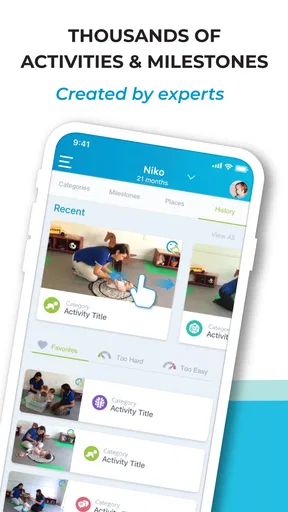
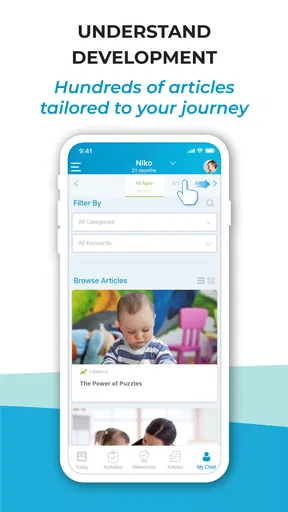
The central idea is simple: choose an activity that fits your child’s stage, follow its guidance, and use play to support skills such as movement, communication, thinking, and social interaction. The app’s library spans children from birth to 36 months, so it is aimed at the demanding early years rather than older kids. That range can make it a useful companion through changing stages, though parents should still treat developmental suggestions as guidance, not a scorecard or a diagnosis.
I would not approach it as a promise that a particular exercise will produce a particular milestone. Babies have their own temperaments, interests, and rhythms. An activity that goes smoothly one day may not work the next, and a child who is not interested in a suggested game is not necessarily falling behind. The best use is to borrow ideas, watch how your baby responds, and stop or adapt when they seem tired, uncomfortable, or simply ready for something else.
Getting Started with BabySparks
First things first, downloading BabySparks is a breeze. Available on both Android and iOS, the app is ready to go with just a few taps. Once installed, you're greeted with a clean and user-friendly interface. The setup process is straightforward: input your baby's age and developmental stage, and you're off to the races.
For a calmer first session, I would set it up when you have a few uninterrupted minutes, rather than while juggling a feed, a nap, and a crying baby. Enter your child’s age carefully, then browse before trying anything. That small pause lets you understand how the activity guidance is presented and choose an idea that fits the space, time, and mood you actually have. You do not need to turn setup into a detailed assessment; the practical goal is to get to one manageable activity.
If you are caring for a baby with an unusual schedule or a corrected age that matters to your family, be thoughtful about how you interpret age-based suggestions. Use your own knowledge of your child and any advice from their healthcare professional when deciding what is appropriate. The app can offer ideas, but it cannot observe your baby or replace a conversation with someone who knows their health and development.
Worth Reading Before You Choose

Flipboard Shows What News Apps Must Do Beyond the Feed

Switching to Android Auto Means Rethinking Your Driving Routine

Google Calendar Makes a Crowded Week Easier to Manage

Ludo King Makes the Most of the Minutes Between Plans

Baby Panda World Brings Quick Play to Modern Phones, but Its Game Library Feels Busy

ESPN’s Live Game View Makes Following Close Games Easier
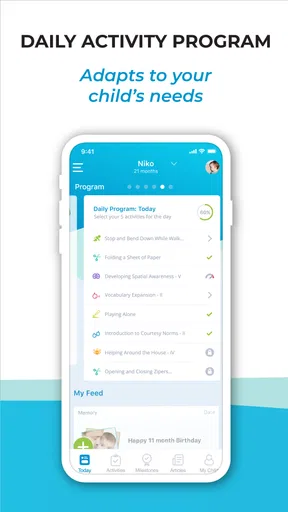
The app is organized into daily activity programs tailored to your baby's specific needs. It's like having a personal trainer for your baby, but without the sweat. Each activity is designed by child development experts and focuses on key developmental areas such as cognitive, motor, social-emotional, and linguistic skills.
Finding a first activity that feels useful
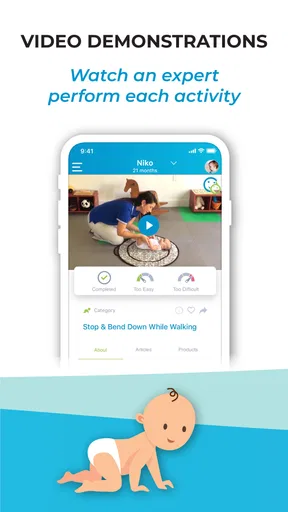
A good first success is not completing a full routine; it is finding one suggestion that feels safe, simple, and enjoyable for both of you. For example, after a diaper change, you might choose a brief floor-play idea while your baby is alert. Give it a try, follow the demonstration, and notice what catches your child’s attention. If they engage for only a short time, that still gives you useful information about what works today.
One practical tip is to keep the app open before you begin, rather than stopping mid-play to search for the next instruction. Read the activity once, gather anything it calls for, and then put the phone aside as much as possible. That helps the activity feel like play instead of a screen-led session, and it makes it easier for you to pay attention to your baby’s cues.
The app is most helpful when it reduces the effort of coming up with an idea, not when it adds pressure to follow a schedule perfectly. If a daily suggestion does not suit the moment, save the concept for later or choose another kind of interaction. A parent who is tired, short on space, or caring for more than one child may get more value from using it selectively than from trying to complete every proposed activity.
Features that Make BabySparks Shine
One of the standout features is the personalized daily program. Every day, you get a new set of activities that are not only fun but also educational. Whether it's tummy time tips or interactive games to boost cognitive abilities, there's something for every aspect of your baby's growth.
Video demonstrations accompany each activity, which I found incredibly helpful. As a parent, it's reassuring to see exactly how to perform each task. Plus, if you're like me and find yourself wondering whether you're doing it right, these videos are a game-changer.
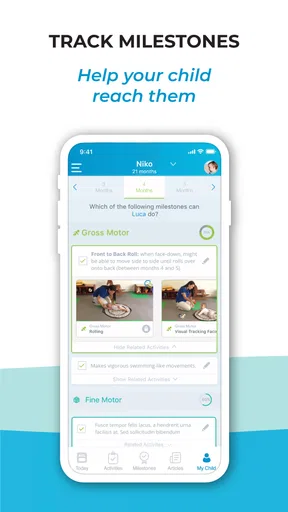
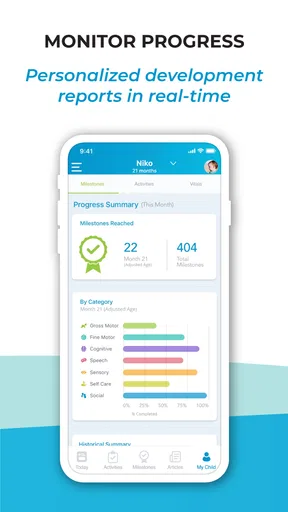
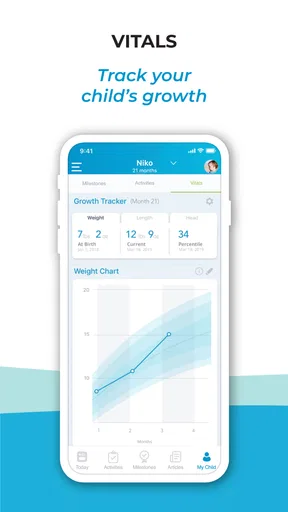
Another feature I love is the progress tracking. You can monitor your baby's development over time, which is both exciting and reassuring. It's like having a baby milestone journal right at your fingertips. This feature also helps you identify areas where your little one might need extra support.
Making the guidance work in real family life
Imagine a rainy afternoon when your baby has woken from a nap, had a feed, and is content but beginning to fuss. Rather than scrolling through parenting posts or trying to invent a game from scratch, you can look for an age-relevant activity, check its demonstration, and try it on the living-room floor. If the baby loses interest, you have not failed a task; you have learned that this was not the right moment. That is a more realistic measure of success than ticking off every item.
The progress record can also be more useful as a memory aid than as a verdict. If you use it, add observations that help you remember what your child enjoys or has tried, and look for broad patterns over time rather than reacting to a single entry. This can give you a clearer starting point for a discussion with a pediatric professional if you have a concern. It should not be used to diagnose a delay or reassure you that a concern can be ignored.
There is a trade-off with any curated activity library: a ready-made suggestion saves planning time, but it cannot account for every family’s routine, culture, available materials, or the baby’s mood that day. I would treat the instructions as a starting point, adapting them only when the change remains safe and makes sense. If an activity feels confusing or unsuitable, skipping it is better than pushing through just because it appears in a program.
When this app fits, and when another approach may be better
Compared with the usual alternatives—general parenting articles, milestone checklists, or asking friends for ideas—BabySparks puts activities and demonstrations in one guided place. That can be especially helpful when you want a concrete thing to try rather than another broad explanation of development. A paper journal may be better if you prefer keeping private notes without using an app, while a clinician’s guidance is the better choice for a specific developmental or medical concern.
I think it suits first-time parents who feel unsure how to turn developmental information into ordinary play, and caregivers who enjoy having a fresh prompt. It may also help a parent who wants to make a short period of floor time feel more intentional. On the other hand, if you already have a routine you love, dislike daily prompts, or find tracking makes you anxious, you may be happier using occasional ideas rather than making the app part of every day.
It is also worth remembering that “personalized” does not mean a human expert is watching your child in real time. The guidance can help you choose an activity, but your own observation remains essential. Follow your baby’s comfort and attention, and ask a qualified professional about persistent concerns instead of relying on an app’s milestones to settle them.
Common points of confusion before you continue
A common question is whether the activities need to be completed in order. I would use the daily program as a menu of ideas, not a strict curriculum. Your baby’s nap, feeding, and energy patterns matter more than finishing a list. If an activity is not a good match today, it is reasonable to move on and return to a similar idea another time.
Another concern is whether the app replaces ordinary play. It should not. Talking, cuddling, looking around together, and responding to your baby are already meaningful parts of daily life. The app’s role is to offer a little structure when you want it, not to make every interaction feel like an exercise or to suggest that spontaneous play is somehow inadequate.
Parents may also wonder whether progress tracking means their child is being assessed. I would read it as a way to keep track of experiences and development-related observations, not as a formal evaluation. If you notice something that worries you, bring that concern to a healthcare professional; an activity app cannot determine what is causing it or what support is needed.
Why Parents Love BabySparks
Parents rave about the app's ability to break down complex developmental concepts into simple, actionable steps. It's not just about keeping your baby entertained; it's about ensuring they're hitting those critical milestones. The app empowers parents by providing the tools they need to actively participate in their child's development.
One thing that stands out to many users is the app's adaptability. Whether you're a first-time parent or a seasoned pro, BabySparks tailors its content to suit your level of experience and your child's unique needs. It's like having a personalized roadmap for your baby's growth journey.
That said, I would soften the idea of “ensuring” milestones: no app can guarantee a developmental result, and children do not follow identical paths. What I value more is the practical bridge from a broad topic to an activity you can try. If that bridge reduces the time you spend searching and leaves more room to interact with your child, the app is doing something useful.
Because the app is free to start and offers in-app purchases, I would explore the parts that are available to you before deciding whether paid options are worth considering. The listed purchase range runs from $1.49 to $119.99 per item, so it is sensible to check the purchase details in the app and make a deliberate choice rather than assuming every activity requires payment. The free starting point makes it easier to judge whether the format suits your family first.
The Bottom Line
In a world where parenting advice is often overwhelming, BabySparks simplifies things. It's an essential tool for any parent wanting to take an active role in their child's early development. The app's comprehensive approach to nurturing your baby's skills is both reassuring and empowering.
I would describe it as a useful source of structure, not an essential tool for every household. Its strongest case is a parent who wants a clear activity suggestion, a visual example, and a way to keep development-related notes in one place. Its weaker case is someone who wants a medical assessment, a no-screen approach to planning, or a program that can adapt instantly to every family circumstance.
If you're keen on giving your baby the best start possible, this app is a must-try. With its expert-backed activities and ease of use, BabySparks is a trusty companion on the parenting journey. So, go ahead, download it, and watch your little one thrive!
My more measured recommendation is to try one suitable activity, see whether the instructions make sense, and decide from that experience whether you want to return. Keep the parts that make play easier, ignore prompts that add pressure, and use professional advice for questions that need more than an activity suggestion. For the right parent, that balance makes BabySparks a helpful companion rather than another thing to keep up with.
Pros
- Offers tailored activities for each child's age.
- Easy-to-use interface for busy parents.
- Tracks developmental milestones efficiently.
- Provides expert-backed activity suggestions.
- Encourages parent-child bonding through play.
Cons
- Some features require premium subscription.
- Limited offline functionality.
- Activities can feel repetitive over time.
- App size may affect older devices.
- Notifications can be overwhelming.
FAQs for BabySparks - Development Activ
What is BabySparks and how can it benefit my child's development?
BabySparks is a developmental app designed to support parents in fostering their child’s growth through age-appropriate activities. It offers a personalized program that adapts to your child’s milestones, providing daily activities that stimulate cognitive, motor, and sensory skills. This app can be a valuable tool in ensuring your child hits developmental targets effectively.
Is BabySparks suitable for all age groups, and how is the content tailored?
BabySparks is primarily aimed at children from birth to three years old. The app tailors its content based on the child's age and developmental stage. It uses a proprietary algorithm to provide activities that are most beneficial for your child’s current growth phase, ensuring that each activity is relevant and impactful.
How user-friendly is the BabySparks app for parents?
The BabySparks app is designed with user-friendliness in mind. It features an intuitive interface that allows parents to easily navigate through activities and track progress. The app also provides helpful tips and video demonstrations to guide parents in performing each activity correctly, making it accessible even for those new to using development apps.
Does BabySparks require a subscription, and what are the costs involved?
BabySparks offers a free version with limited access to activities, but for full access, a subscription is required. The app provides monthly, quarterly, and annual subscription options, each with varying costs. Subscribing unlocks the complete library of activities and personalized daily plans, offering comprehensive developmental support.
Is BabySparks available on both Android and iOS, and how can I download it?
Yes, BabySparks is available for both Android and iOS devices. You can download it through the Google Play Store for Android users, and the Apple App Store for iOS users. Simply search for 'BabySparks' in your respective app store, and follow the download and installation instructions to get started.


